
Download Keeper Password Manager – secure password manager, free trial, encryption
Overview
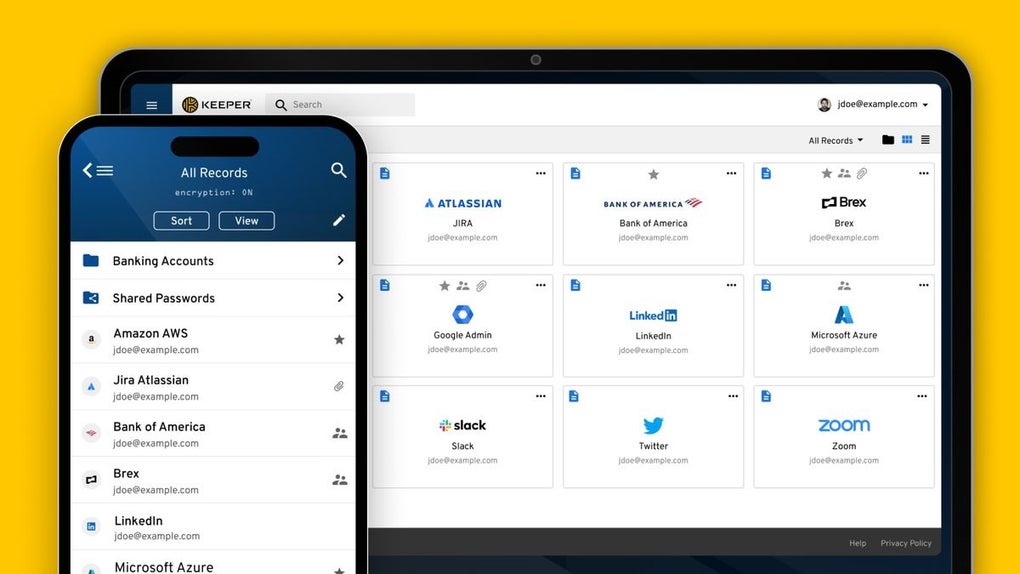
Keeper Password Manager is a web‑based security solution that helps individuals and businesses protect their digital identities by storing passwords, credit‑card numbers, secure notes, and other sensitive data in a single encrypted vault. The trial version lets users explore the full set of capabilities without an upfront commitment, making it an ideal entry point for anyone looking to upgrade from weak, reused passwords to a robust, industry‑standard password‑management practice. Keeper’s design emphasizes simplicity: an intuitive dashboard presents all stored credentials in a clean, searchable list, while a powerful password generator creates complex, unique passwords with a single click.
Secure sharing lets you exchange login information with teammates or family members without exposing the raw password, and automatic sync ensures that changes made on a desktop are instantly reflected on mobile devices. The application also integrates with popular browsers and operating systems, providing a seamless experience whether you’re on Windows, macOS, Android, or iOS. By encrypting every piece of data locally before it ever reaches Keeper’s cloud servers, the tool guarantees that only you hold the decryption key, thereby eliminating the risk of server‑side breaches.
In short, Keeper Password Manager combines strong cryptography, cross‑platform flexibility, and an easy‑to‑learn interface to give users confidence that their credentials are safe, organized, and readily accessible whenever they need them.
Key Features
- End‑to‑End Encryption: All vault data is encrypted on the device with AES‑256 before it is uploaded, ensuring that only the user can decrypt the information.
- Intelligent Password Generator: Generates random passwords of any length, with options for symbols, numbers, and uppercase characters to meet any site’s requirements.
- Secure Sharing & Permissions: Share credentials with colleagues or family members via encrypted links, with granular control over view‑only or edit access.
- Cross‑Platform Sync: Real‑time synchronization across Windows, macOS, Linux (via web), Android, and iOS devices.
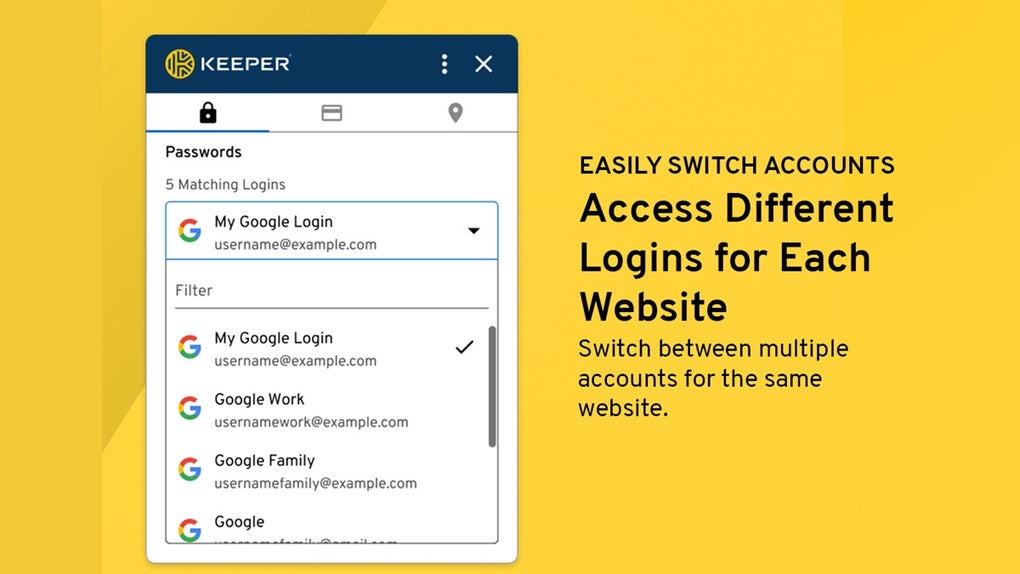
- Browser Extensions: Chrome, Firefox, Edge, Safari extensions auto‑fill login fields, saving time and reducing keystroke errors.
- Dark Web Monitoring: Alerts you if your stored credentials appear in known data breaches, prompting immediate password changes.
- Secure Notes & Document Storage: Store encrypted notes, software licenses, or scanned copies of passports and IDs within the same vault.
- Two‑Factor Authentication (2FA): Optional 2FA via TOTP, hardware tokens, or biometric verification adds an extra layer of protection.
- Activity Log & Auditing: Detailed logs show who accessed which credential and when, essential for compliance in regulated industries.
- Automatic Password Change (Beta): For supported sites, Keeper can rotate passwords automatically, reducing the risk of credential reuse.
Installation & Usage Guide
Getting started with Keeper Password Manager is straightforward, whether you prefer a desktop client, a mobile app, or the web portal. Follow the steps below to download, install, and begin securing your credentials.
Step‑by‑Step Installation
- Choose Your Platform: Visit the official Keeper website and select the appropriate installer for Windows, macOS, Android, or iOS. A web version is also available for Linux users.
- Download the Installer: Click the “Download Free Trial” button. The file will be saved to your default download folder.
- Run the Installer:
- Windows: Double‑click the .exe file and follow the on‑screen prompts.
- macOS: Open the .dmg file, drag the Keeper icon into the Applications folder.
- Android: Open the .apk file (or use Google Play) and tap “Install”.
- iOS: Use the App Store to download the Keeper app.
- Create an Account: Launch the application and click “Create Account”. Provide an email address, set a master password (the only password you’ll need to remember), and agree to the terms of service.
- Verify Email & Set Up 2FA: Check your inbox for a verification link, then enable two‑factor authentication for added security.
First‑Time Usage
After installation, the dashboard welcomes you with a clean layout. Use the “Add New Entry” button to store your first password. You’ll be prompted to enter a site name, URL, username, and the password itself.
Keeper will ask if you want to generate a stronger password; click “Generate” to let the tool create one automatically. Tags can be added to categorize entries (e.g., “Work”, “Finance”, “Personal”). The built‑in search bar filters results instantly, and the browser extension can be activated to autofill credentials on visited sites.
For secure sharing, select an entry, click “Share”, and choose the recipient’s email; Keeper creates an encrypted link that expires after a configurable period. All changes sync across devices within seconds, so you can switch from desktop to phone without missing a beat.
Compatibility
Keeper Password Manager supports the following operating systems:
- Windows 10, 11 (64‑bit)
- macOS 10.14 (Mojave) and later
- Android 6.0 (Marshmallow) and later
- iOS 12 and later
- Web browsers on Linux via KeeperWeb (Chrome, Firefox, Edge, Safari)
The application leverages native encryption libraries on each platform, ensuring consistent security standards regardless of device type.
Pros and Cons
Pros
- Military‑grade AES‑256 encryption protects data both at rest and in transit.
- Cross‑platform sync eliminates the need for multiple password stores.
- Built‑in password generator and automatic password change reduce credential reuse.
- Secure sharing with granular permissions is ideal for teams and families.
- Dark web monitoring provides proactive breach alerts.
- User‑friendly interface requires minimal training.
- Extensive 2FA options (TOTP, biometrics, hardware tokens).
Cons
- The free trial limits the number of vault entries; full functionality requires a paid license.
- Some advanced features (e.g., automatic password change) are still in beta.
- Enterprise admin console is only available in higher‑tier plans.
- Initial setup may be intimidating for non‑technical users.
- Browser extensions occasionally need manual re‑authentication after updates.
Frequently Asked Questions
Is Keeper Password Manager free to use?
Keeper offers a 30‑day free trial that includes all premium features. After the trial, a subscription is required to continue using the full suite of tools.
How does Keeper protect my master password?
The master password never leaves your device. It is used locally to derive the encryption key that secures your vault. Keeper’s servers store only encrypted data, making it impossible for them to access your master password.
Can I share passwords securely with coworkers?
Yes. Keeper’s secure sharing feature encrypts the credential and sends a time‑limited link to the recipient. You can set permissions (view‑only or edit) and revoke access at any time.
Does Keeper work offline?
All vault data is stored locally on your device, so you can access passwords without an internet connection. Changes made offline sync automatically once you reconnect.
What happens if I forget my master password?
Because the master password is never stored, Keeper cannot recover it. If you forget it, you will need to reset the vault, which erases all stored data. This underscores the importance of remembering or securely backing up the master password.
Is Keeper compliant with GDPR and other regulations?
Yes. Keeper adheres to GDPR, HIPAA, and ISO 27001 standards, providing data‑processing agreements and audit logs for enterprise customers.
Conclusion & Call to Action
Keeper Password Manager delivers a comprehensive, security‑first approach to password management that scales from individual users to large enterprises. Its blend of end‑to‑end encryption, seamless cross‑device sync, and advanced features such as dark‑web monitoring and secure sharing makes it a standout choice in a crowded market. While the trial limits some capabilities and the learning curve can be steep for beginners, the long‑term benefits of stronger, unique passwords and centralized credential control far outweigh these minor drawbacks. If you’re ready to replace sticky notes, spreadsheets, and reused passwords with a modern, trustworthy vault, download the Keeper trial today and experience the peace of mind that comes with industry‑grade protection.
Start your free trial of Keeper Password Manager now and take the first step toward a more secure digital life.
Keeper Password Manager impresses with its robust encryption, intuitive UI, and cross‑platform capabilities. The trial provides enough features to evaluate its suitability for personal or business use, and the optional 2FA adds an extra security layer. Minor drawbacks include the limited number of entries in the free version and occasional extension re‑authentications, but overall the product earns a solid 4.5‑star rating.



.png)



